A separate consent tool to wire up
Configure the banner and categories in the same dashboard that runs your analytics.
Cookie consent management
Show a compliant consent banner, hold tracking until visitors opt in, and keep an audit log — without bolting on a separate consent platform.
Problems it solves
Configure the banner and categories in the same dashboard that runs your analytics.
Opt-in mode and auto-block hold tags until the visitor agrees.
Every decision is recorded with a timestamp for your audit trail.
Workflow
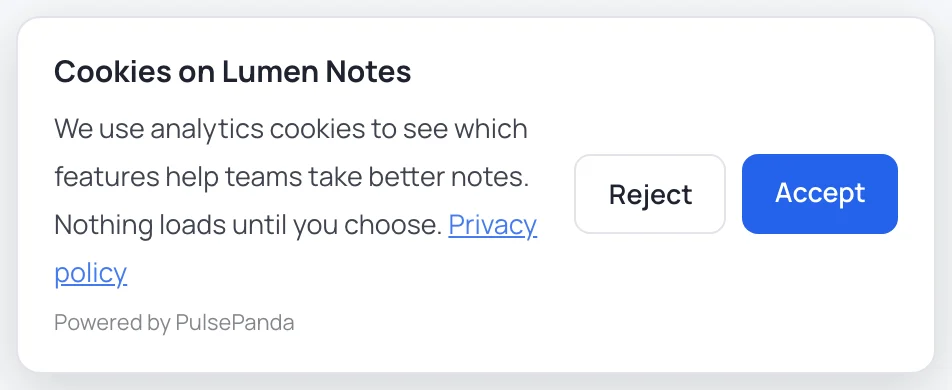
Pick GDPR opt-in or CCPA opt-out, then set the title, text, and buttons.
Group cookies as necessary, analytics, or marketing with clear descriptions.
Auto-block until consent, then log every accept or reject.
Under the hood
What actually happens in the browser before and after a visitor chooses.
In opt-in mode the PulsePanda snippet waits for a decision before it starts. Until the visitor accepts analytics there is no session replay, no heatmap or click, scroll and input capture, no event tracking, and no identifier written to the browser.
To hold back Google Analytics, the Meta pixel or any other tag, change its type to text/plain and add data-pp-consent with the category it belongs to. The browser ignores a script of that type, so it never runs. When the visitor grants the category, PulsePanda swaps each tagged script for a live copy with the same attributes, so external and inline scripts both run. External ones load asynchronously, so a tag that must run before another should be inlined or chained.
<!-- Runs only after the visitor accepts "marketing" -->
<script type="text/plain" data-pp-consent="marketing"
        src="https://connect.facebook.net/en_US/fbevents.js"></script>

<!-- Inline scripts work the same way -->
<script type="text/plain" data-pp-consent="analytics">
  gtag('config', 'G-XXXXXXXXXX');
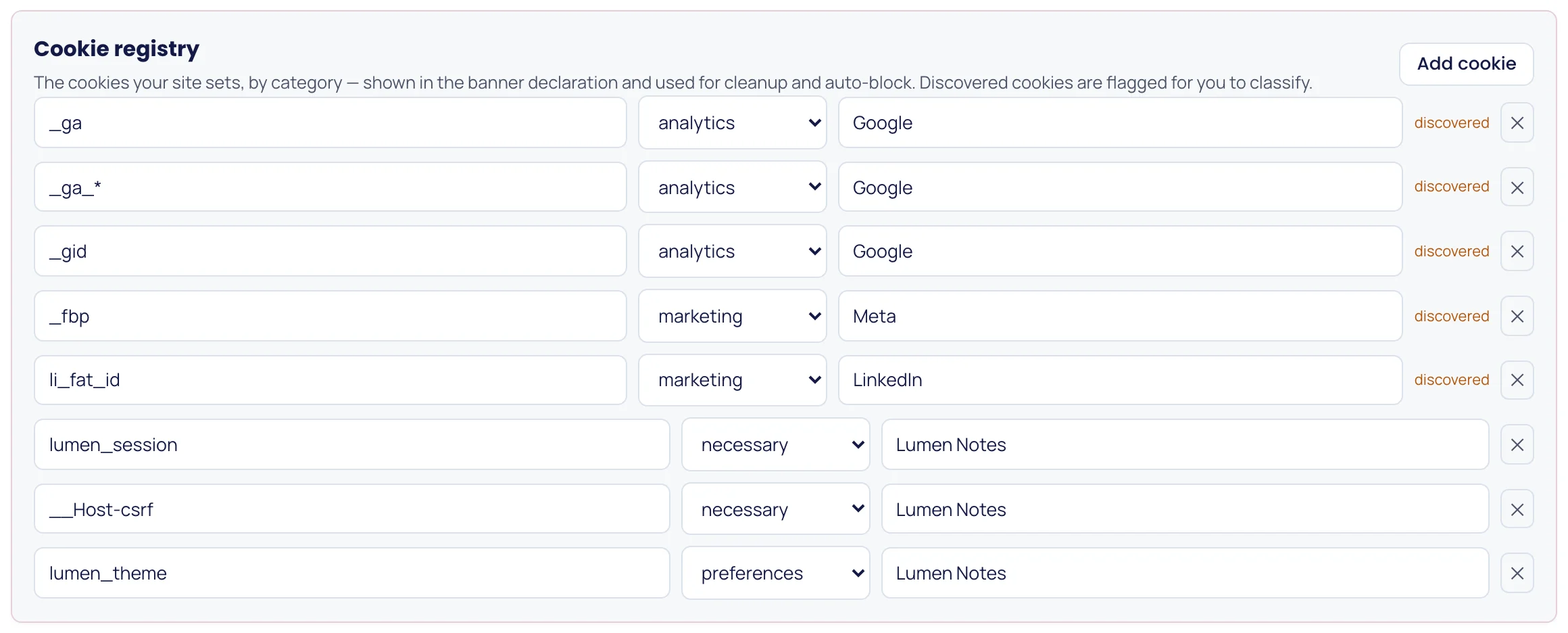
</script>Tagging covers the scripts you know about. With auto-block on, PulsePanda also watches every cookie a script tries to write through document.cookie. A cookie from a category the visitor has not granted is dropped. In opt-in mode, a cookie that is not in your registry at all is dropped too until the visitor decides. Strictly necessary cookies always pass.
It is best-effort by design, and it is worth knowing where it stops: it cannot see cookies your server sets with a Set-Cookie header, or cookies written inside a third-party iframe. Gate those at the source.
When a visitor turns a category off, PulsePanda expires the cookies your registry lists for that category, on both the current host and the parent domain, instead of leaving them to linger until they expire.
Google Consent Mode v2
Each choice reaches your GA4 and Google Ads tags as a consent update.
When the PulsePanda banner is your consent tool, every decision reaches Google tags as a Consent Mode v2 update, through the same dataLayer that gtag.js and Google Tag Manager read. A returning visitor's stored choice is sent again on each page, and withdrawing consent sets the signals back to denied.
A category your banner does not offer stays denied, so turn on Marketing if you run Google Ads tags.
Consent Mode needs a default state before any Google tag runs. In Google Tag Manager, the PulsePanda Analytics tag template sets it: tick Set Google Consent Mode defaults, fire the tag on Consent Initialization - All Pages, and optionally list the regions where consent is required. It also restores a returning visitor's choice before other tags fire. With gtag.js, set the defaults above your Google tag:
<script>
  window.dataLayer = window.dataLayer || [];
  function gtag() { dataLayer.push(arguments); }
  gtag('consent', 'default', {
    analytics_storage: 'denied',
    ad_storage: 'denied',
    ad_user_data: 'denied',
    ad_personalization: 'denied',
    wait_for_update: 500
  });
</script>
Each update is followed by a pulsepanda_consent event in the dataLayer, which you can use as a Tag Manager trigger. If another platform collects consent and passes it to PulsePanda with setConsent, PulsePanda leaves Google consent to that platform.
Consent modes
One setting decides whether tracking waits for a yes or starts until someone says no.
| Opt-in (GDPR, ePrivacy) | Nothing non-essential runs until the visitor accepts. The banner shows on the first visit with Accept and Reject side by side, and a visitor who ignores it is never counted as a yes. |
|---|---|
| Opt-out (CCPA, CPRA) | Tracking starts granted and the banner lets visitors switch categories off. A switch takes effect immediately and the related cookies are cleaned up. |
| Notice-only | Tracking starts granted and the banner informs rather than asks, for sites where a notice is all the law requires. |
| Do Not Track and GPC | With “Respect Do Not Track / GPC” on, a browser sending either signal is treated as having rejected every non-essential category, and is not shown a banner at all. |
| Re-asking | A choice is remembered for 180 days by default (you set the number). Bump the policy version after changing your cookie policy and every stored choice becomes invalid, so everyone is asked again. |
What you get
| Modes | GDPR opt-in and CCPA opt-out, plus Do-Not-Track respect. |
|---|---|
| Control | Custom categories, auto-blocking, and a cookie registry. |
| Evidence | A consent log and insights on accept and reject rates. |
Our own footprint
The PulsePanda snippet does not set cookies. Once a visitor has consented it keeps three keys in localStorage:
If a visitor rejects analytics or withdraws it later, capture stops and the visit and anonymous ID keys are deleted. List the three keys in your cookie policy; the dashboard shows them next to the banner settings.
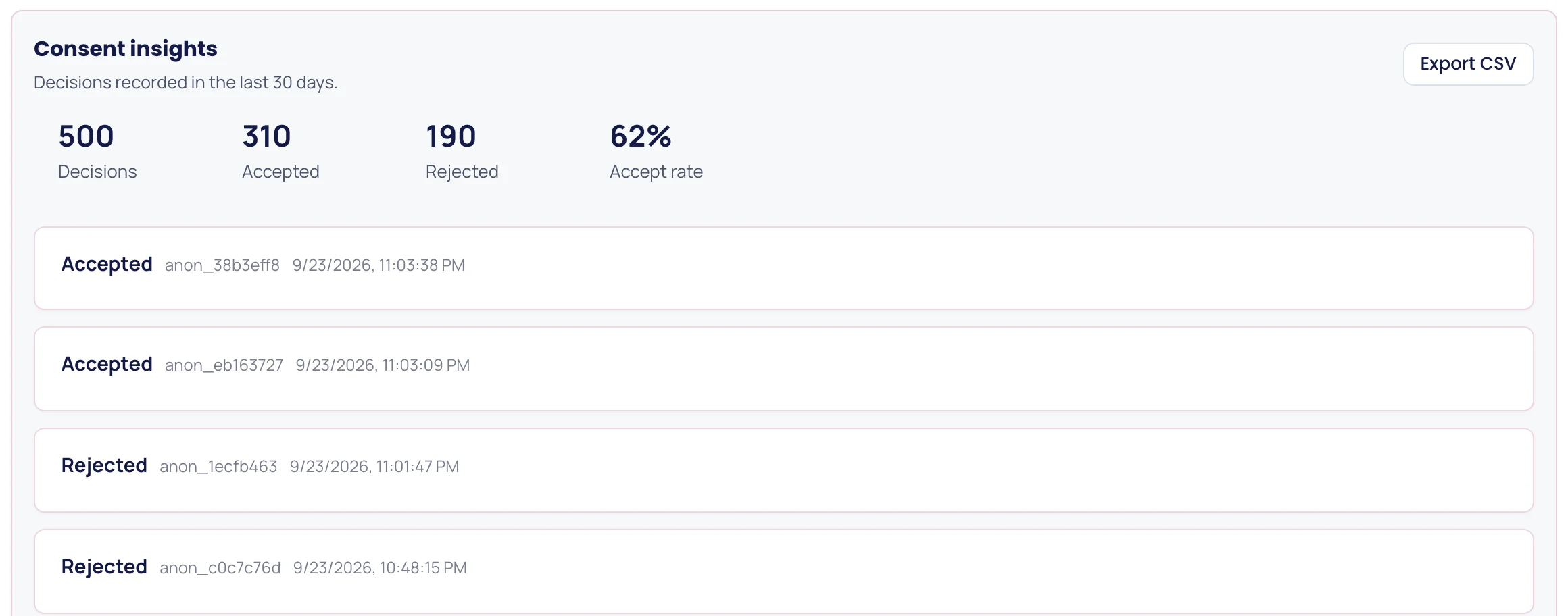
Each decision is also recorded in your workspace with the anonymous ID, the categories chosen, the policy version and a timestamp. Consent insights shows the recent ones with your accept rate, and exports them as CSV when someone asks you to show consent was given.
Existing setups
You do not have to replace a consent platform you already run. Leave the PulsePanda banner off, and pass the decision your platform collects to PulsePanda from its consent callback:
<script>
  window.PulsePanda = window.PulsePanda || [];
  // Call from your CMP's consent callback:
  window.PulsePanda.push(['setConsent', true]);   // visitor granted analytics
  // window.PulsePanda.push(['setConsent', false]); // visitor refused or withdrew
</script>
Using the PulsePanda banner instead? Link “Cookie settings” in your footer to window.PulsePanda.push(['showConsentBanner']) so visitors can change their mind at any time, which GDPR requires to be as easy as giving consent.
Honest limits
PulsePanda's consent manager is built for teams that want consent and analytics in one place. It is not the right tool for every site. Choose a certified consent platform such as Cookiebot or OneTrust if you need any of these:
If all you need is a banner and no analytics, the free cookie consent banner generator gives you a dependency-free one to paste into any site.
FAQ
It includes a configurable consent banner, categories, auto-blocking, and a consent log built into the same workspace as your analytics.
Yes. Choose opt-in (GDPR) or opt-out (CCPA) mode, and optionally respect Do Not Track.
Yes. Auto-block holds non-essential cookies and tags until the visitor accepts.
FAQ
No. It stores three localStorage keys after consent (_sr_vid, _sr_uid and _pp_consent) and deletes the tracking ones if a visitor rejects or withdraws.
Yes. When the PulsePanda banner is your consent tool, each visitor's choice reaches Google tags as a Consent Mode v2 update: Analytics sets analytics_storage; Marketing sets ad_storage, ad_user_data and ad_personalization; Preferences sets functionality_storage and personalization_storage. Set the defaults before Google tags load, with the PulsePanda Google Tag Manager template or your own gtag consent default call. It does not generate an IAB TCF consent string.
No. If you run programmatic advertising that needs a TCF consent string, use a certified consent platform and pass its decision to PulsePanda with setConsent.
Increase the policy version in the banner settings. Stored choices made under the old version stop counting, so every visitor sees the banner again.
Yes. Consent insights shows recent decisions and exports them as CSV with the timestamp, whether the visitor accepted or rejected, their anonymous ID and the policy version they saw.
Related pages
Install once and connect product analytics, replay, heatmaps, funnels, and feedback in minutes.
Start for free