An event is a decision you made, not a thing that happened
Every product emits an unlimited number of things that happened: clicks, scrolls, hovers, route changes. An event is the small subset you decided is worth a name, because it tells you something you would act on. That decision, not the instrumentation, is the whole job.
The practical consequence is that a tracking plan is a product document rather than an engineering one. If you cannot say what you would do differently depending on whether an event fires, it does not need to exist yet.
Name events after outcomes, not interfaces
clicked_blue_button stops being true the moment design ships a redesign. report_exported survives it, because it names what the user achieved rather than what they touched.
Pick one convention and hold it: object first, action in the past tense, lowercase with underscores — invite_sent, project_created, payment_failed. Consistency matters more than which convention you picked, because inconsistent names are what make an event catalogue unsearchable two quarters in.
A naming convention you can copy
Most teams do not need to invent a convention, only to write one down. This one is short enough to remember and strict enough to keep a catalogue searchable:
| Rule | Do | Don't |
|---|---|---|
| Object first, then the action | invite_sent | sent_invite |
| Past tense, because it already happened | project_created | create_project |
| Lowercase with underscores | plan_upgraded | PlanUpgraded, plan-upgraded |
| Name the outcome, not the control | report_exported | export_button_clicked |
| Variants go in properties | report_exported with format: csv | report_exported_csv |
| No personal data in names or values | plan: team | email: ana@acme.com |
Put the convention at the top of the tracking plan and review new events against it the way you review code against a style guide. A bad name is paid for every time someone searches for the event and cannot find it.
Ten to twenty events, not two hundred
The common failure is tracking everything on the theory that data might be useful later. What you get is a catalogue nobody can navigate, three events that mean nearly the same thing, and no agreement about which one is authoritative.
Start from the questions you already ask in reviews — are people getting set up, are they coming back, where do they give up — and instrument only what answers them. A tracking plan that fits on one screen gets maintained. One that fits in a spreadsheet does not.
A worked example: a tracking plan for a B2B SaaS app
Here is what twelve events look like for a typical team-based SaaS product. Each one exists because it answers a question somebody already asks in a weekly review.
| Event | Fires when | Key properties | The question it answers |
|---|---|---|---|
signup_completed | The account exists, not when the form is submitted | source | Which channels bring people who actually finish? |
workspace_created | The first workspace is saved | team_size | How many signups get as far as setting up? |
teammate_invited | An invite is sent | role | Is the account spreading beyond one person? |
invite_accepted | The invited person joins | role | Do invites turn into teammates? |
integration_connected | A connection succeeds | integration | Which integrations do retained teams use? |
project_created | A project is saved | template | Is the core object being created at all? |
report_viewed | A report finishes rendering | report_type | What do people come back to look at? |
report_exported | The file is generated | format | Is the output leaving the product? |
plan_upgraded | Billing confirms the change | from_plan, to_plan | What happens right before people pay more? |
payment_failed | The billing provider reports a failure | reason | How much churn is involuntary? |
subscription_cancelled | The cancellation takes effect | reason | Why do teams leave? |
feedback_submitted | The feedback form is sent | category | What are users asking for, in their own words? |
Two things are worth noticing. Most of these fire on an outcome, not on a click: an invite can be clicked and still fail. And the billing events do not happen in the browser at all. They arrive from your billing provider's webhooks, so browser-only analytics will never see them. That is fine as long as nobody treats a click on “Upgrade” as revenue.
Activation is usually a combination of these rather than any one of them, for example a workspace created and a teammate invited within the first week. Choose that definition on purpose; activation funnel benchmarks covers how.
Properties carry the detail; events carry the verb
Resist a separate event per variant. report_exported_csv, report_exported_pdf and report_exported_xlsx should be one event, report_exported, with a format property. The rule of thumb: if you would ever want to see the numbers added together, it is one event with a property.
Keep property values low-cardinality and stable. A property holding a raw URL or a free-text string is a column you cannot group by, which makes it decoration rather than data.
Event tracking mistakes that quietly break reports
- Firing on the click instead of the result. A click on “Export” is not an export. If the request fails, the event has already lied. Send outcome events once the thing has succeeded.
- Double-firing in single-page apps. A component that re-renders or a route that mounts twice can send the same event twice. Check a few sessions by hand before you trust a count.
- Personal data in properties. Emails, names and URLs with tokens in the query string end up in every report and every export. Send an ID or a category instead.
- Tracking before consent. Where GDPR applies, analytics should not start until the visitor agrees. That is a property of your setup rather than of each event, so solve it once, with a cookie consent manager that holds tracking back until then.
- Changing what an event means without renaming it. If
project_createdstarts counting duplicated projects, every chart before and after the change disagrees and nobody can tell why. A new meaning gets a new name, or a property that tells the two apart. - Events without an owner. Each event in the plan needs a person who notices when it stops firing. Unowned events decay first and are trusted longest.
Autocapture and explicit events answer different questions
Autocapture records interface interactions without asking you to plan, which is genuinely useful early: it means the data for a question you had not thought of yet is already there, and it removes the deploy from the loop. What it cannot do is know your domain. Nothing in a click stream knows that a subscription was upgraded.
The workable arrangement is both: autocapture for exploration and for the questions you have not asked yet, a short list of explicit, well-named domain events for the numbers you report on and set goals against.
Defining events after the fact
Autocapture changes the question from “did we remember to instrument this?” to “can we find it in what was captured?”. PulsePanda records every click with the element's id, classes, visible text, tag and position in the page, so an event can be defined later from those, and the definition applies to clicks captured before it existed. A question asked on Thursday can be answered with Monday's data.
What makes that reliable is a stable hook in the markup. Classes change with every redesign and visible text changes with every copy edit and translation. An id on the handful of controls that matter changes only when someone decides it should:
<button id="export-report">Export</button>
<button id="invite-teammate">Invite</button>
<a id="upgrade-plan" href="/billing">Upgrade</a>
An event defined as clicks on #export-report survives a redesign, and a click on the icon or label inside the button still counts, because the recorded path runs up to the nearest element with an id.
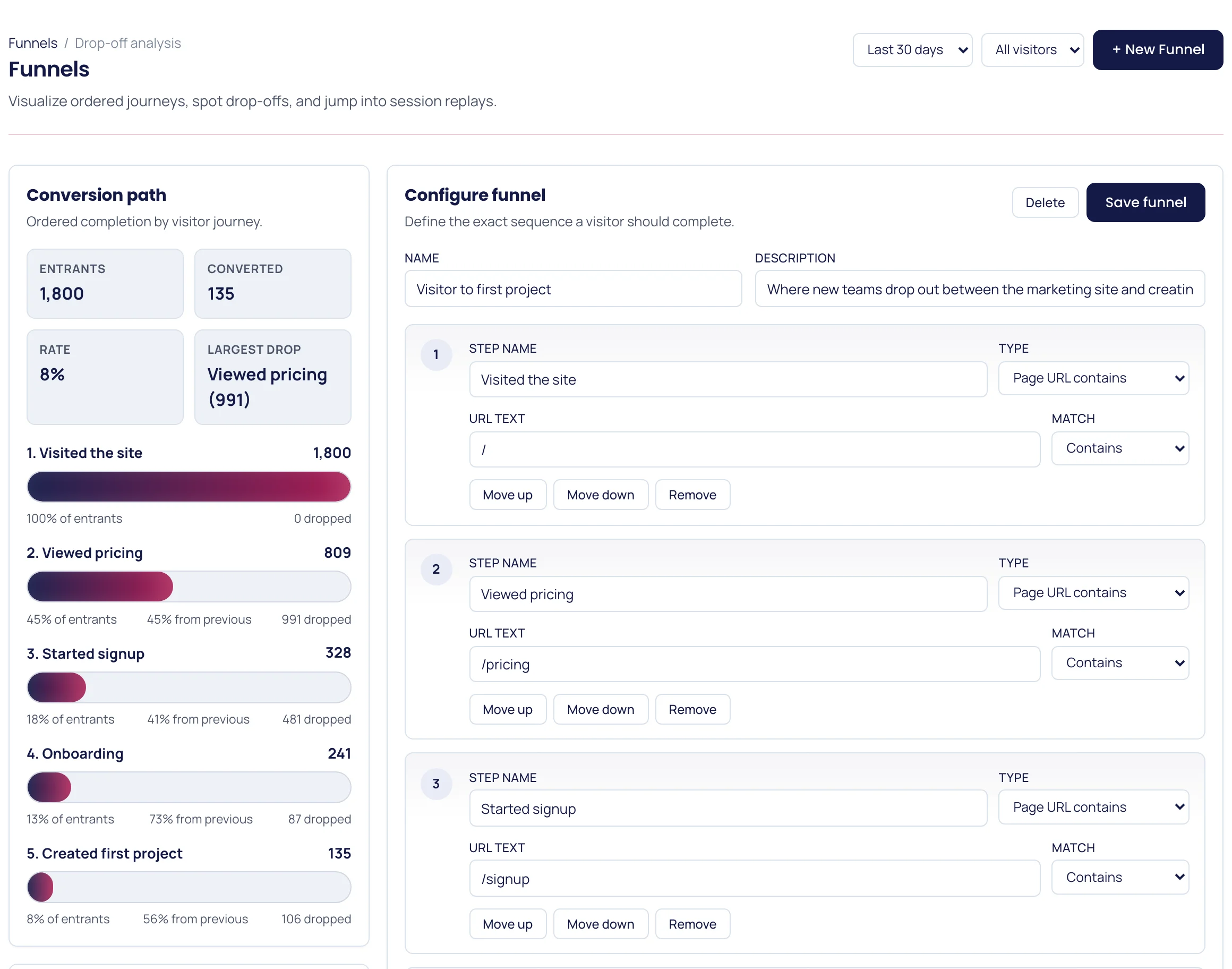
A defined event is still a click, with the limit described above: it tells you someone tried, not that it worked. For outcomes, the more honest signal is often the page that success leads to. A funnel step of “reached /onboarding” after “reached /signup” counts completed signups without any event at all.
How to check an event before you trust it
- Trigger it yourself and find your own session. The event should appear once, with every property filled in.
- Compare the count with a source of truth. If the database says 140 projects were created last week and analytics says 95, find the gap before anyone builds a chart on it. Ad blockers, consent and failed requests all make browser counts lower than server counts. The gap should be steady, not a surprise.
- Watch a session replay where it fired. A number tells you it happened; a recording tells you it happened when you think it did.
- Put it in a funnel. An event that turns up without the step that must come before it is firing from the wrong place.
Where to start this week
Write down the five moments that matter most in your product, name them with the convention above, and instrument only those. Then check a week later that each one fires when you expect and that its properties are populated — an event that fires on a code path nobody uses is worse than no event, because it will be trusted.
If you want to see how the events you already send are behaving before adding more, event tracking in PulsePanda shows every event, its volume and its properties in one place, and feeds the same data straight into funnels and paths.